Upskilling Academy
Trusted by 3 million learners 24/7 online training Money back guarantee Fully accredited courses
Level 3 Certificate in Web Design for Non-Designers A Practical Guide Thumbnail Lifetime Access
Sale

Level 3 Certificate in Web Design for Non-Designers A Practical Guide

Web Design for Non-Designers: A Practical Guide Overview In today’s digital age, possessing basic web design skills can…

Best Seller Limited Time Offer
Last Updated 18 Sep 2026 352 Enrolled English Flexible Schedule

Access to 1500+ Courses with free CPD Certificates for Only £99 Get Now

What you will learn

  • - Gain confidence in designing professional-looking websites without needing prior design experience
  • - Learn essential design principles that make any website more user-friendly and visually appealing
  • - Apply practical techniques and tools you can use immediately, even if you don’t know how to code
  • - Save money and time by handling basic web design tasks yourself
  • - Improve collaboration and communication with designers and developers
  • - Create websites that work well on any device and attract more visitors
  • - Build a strong foundation to advance into more complex web or graphic design skills in the future

Description

Web Design for Non-Designers: A Practical Guide

Overview

In today’s digital age, possessing basic web design skills can unlock countless opportunities for creativity, communication, and career advancement, even for those without formal training in design or technical fields. Web Design for Non-Designers: A Practical Guide is a hands-on, accessible course crafted specifically for beginners who want to understand and apply the core principles of web design without being overwhelmed by jargon or complex software.

Whether your goal is to build a personal website, enhance your professional profile, support your small business, or better collaborate with design and development teams, this course will equip you with the confidence and competence to create visually appealing, user-friendly websites with ease.

Description

This course demystifies the process of web design by stripping it down to its most essential elements. Through engaging lectures, real-world case studies, and interactive exercises, students learn what makes a website attractive, functional, and accessible—even if they don’t have a background in art, design, or coding.

The curriculum is broken down into easy-to-follow modules, each focused on a practical skill or concept. You’ll explore the fundamentals of visual hierarchy, color theory, typography, and layout—all without relying on expensive software or advanced tools. Instead, you’ll use free or low-cost resources readily available online, ensuring your skills are immediately transferable to real-life projects.

  • Module 1: Understanding the Web – Learn the basics of how websites work and how users interact with them.
  • Module 2: Principles of Design – Discover the visual building blocks (contrast, alignment, repetition, proximity) that make websites look professional.
  • Module 3: Tools without Tech Overwhelm – Get hands-on with beginner-friendly design and prototyping platforms like Canva, Figma, and built-in website builders (Wix, Squarespace).
  • Module 4: Creating Your First Pages – Walk step-by-step through the process of designing and publishing basic web pages, focusing on usability and aesthetics.
  • Module 5: Essential Web Content – Learn best practices for writing and organizing copy, selecting imagery, and structuring navigation for a seamless experience.
  • Module 6: Collaboration and Handoff – Understand how to communicate your ideas, collaborate with web developers, and prepare your assets for production.

By the end of the course, you’ll have completed a project portfolio that showcases your capacity to conceptualize and create clean, compelling websites—ready to share with colleagues, employers, or the world!

Career Path

While this course is designed for non-designers, the skills you gain can significantly boost your professional growth and expand your role in various fields. Upon completion, you’ll be able to:

  • Build and manage personal and portfolio sites for freelance ventures or personal branding.
  • Support small businesses, charities, or community groups by designing low-cost, high-impact websites.
  • Enhance your current role by collaborating more effectively with designers and developers, understanding web project requirements, and contributing to content or marketing initiatives.
  • Pursue new roles such as website coordinator, content manager, digital marketer, or junior web designer for teams that value versatility and a “can-do” attitude over formal backgrounds.
  • Prepare for more advanced study in design, development, or user experience with a strong, confidence-boosting foundation.

The course provides a springboard into the ever-expanding digital workplace, equipping you with the resources and mindset needed to tackle new challenges and meet the growing demand for web-savvy professionals.

Who Is This Course For?

This course is thoughtfully tailored to fit the needs of:

  • Entrepreneurs and small business owners looking to create or revamp their own websites without outsourcing everything.
  • Marketing, content, support, and admin staff who want practical web skills to support their teams or manage websites more confidently.
  • Teachers, students, and non-profits seeking cost-effective ways to build an online presence.
  • Job seekers and career switchers who recognize the value of adding digital design skills to their resumes, regardless of previous experience.
  • Anyone curious about web design but intimidated by technical complexity or their lack of artistic background.

It’s perfect for those who want to move beyond theory and create tangible results quickly—no art degree or coding experience required!

Requirements

  • No prior design or coding experience necessary! This course is specifically aimed at beginners and non-designers.
  • Access to a desktop or laptop computer with an internet connection is required for hands-on exercises and assignments.
  • Basic computer literacy (familiarity with using web browsers, managing files, and navigating online tools).
  • A willingness to experiment and learn by doing—we believe the best way to build your skills is through practical, real-world tasks.
  • Optional: Access to free or paid accounts on popular design tools (such as Canva or Figma) will be helpful, but we’ll cover free alternatives and how to sign up in the first lesson.

All resources, templates, and supplementary materials will be provided as part of the course. With your curiosity and commitment, you’ll be amazed at how quickly you can create beautiful, functional web pages and begin your journey as a confident web creator!

Course Curriculum

Course Content

Module 1_ Introduction to Web Design

  • Lesson 1_ Introduction to Web Design

Module 2_ User Experience (UX) Design

Module 3_ Layout and Composition

Module 4_ Color Theory and Psychology

Module 5_ Typography in Web Design

Module 6_ Visual Elements in Web Design

Who should take the course

  • - Small business owners who want to create or improve their websites
  • - Entrepreneurs launching a startup or side project
  • - Professionals who need to manage or update their workplace website
  • - Bloggers or writers building their personal brand online
  • - Students interested in learning web design basics
  • - Non-tech team members collaborating with web developers
  • - Anyone curious about web design with no prior experience

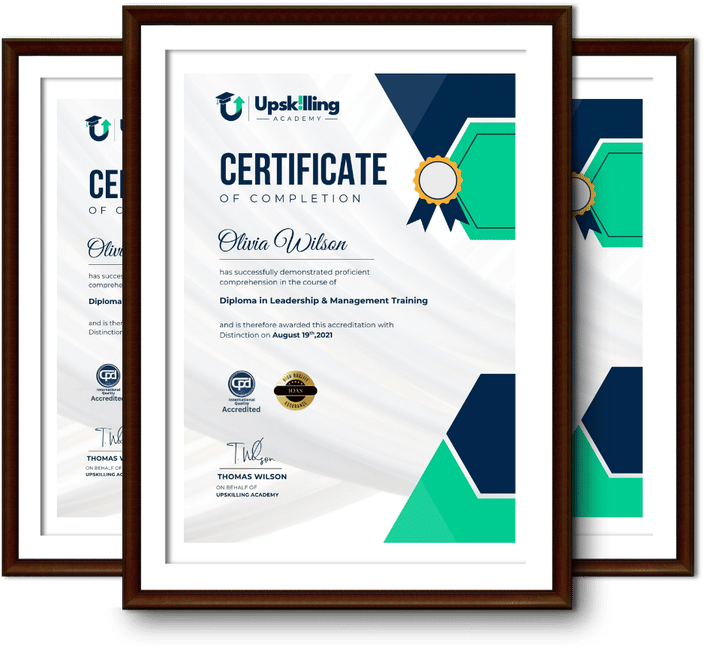
Certificate for Success at Every Step

  • No expiry date. You can keep and use the certificate forever.
  • Recognised across various UK industries.
  • Increases your chances of employability.
  • Boosts your professional credibility.
  • Shows you're up to date with industry knowledge.
Framed Upskilling Academy certificates of completion

Course Reviews

Christine Ferguson

My experience with you was fantastic and easy to navigate. I'm looking forward to taking the course.
Jesse Harding

Provided highly informative and helpful responses, with quick and efficient replies.

Gary Schwartz

The course selection is broad, engaging, easy to follow, and offers a good challenge.

Bailey Burrows

Excellent course with user-friendly website navigation, making it easy to follow. I'm really enjoying the experience.

Benjamin Moreno

Great course with valuable information. Easy to follow, and I appreciated the flexibility to work at my own pace.

Quality Accreditation

  • incensu Registered Education Supplier
  • Association of Healthcare Trainers member
  • The CPD Group approved provider #790985
  • Disability Confident Committed

FAQ for Level 3 Certificate in Web Design for Non-Designers A Practical Guide

How do I access my course?

Once you complete your purchase, you’ll receive access to your course through your Upskilling Academy account. You can log in and access your learning materials online at any time.

How long do I have access to the course?

Your access period depends on the course and the package you purchase. Please check the course details or your order information for the applicable access period.

Can I study at my own pace?

Yes. Upskilling Academy courses are designed to provide flexible online learning, allowing you to study at a pace that suits your schedule.

Will I receive a certificate?

Certificate availability varies by course. Where a certificate is included, you’ll receive information about the requirements and how to obtain it within the course or upon completion.

Are the courses suitable for beginners?

Many courses are suitable for beginners, while others may assume some previous knowledge. Please review the individual course description for information about the recommended level and prerequisites.