Upskilling Academy
Trusted by 3 million learners 24/7 online training Money back guarantee Fully accredited courses
Level 3 Certificate in Techniques for Virtual Presentations Thumbnail Lifetime Access
Sale

Level 3 Certificate in Techniques for Virtual Presentations

Techniques for Virtual Presentations Overview In today’s ever-evolving professional landscape, the ability to confidently deliver engaging and effective…

Best Seller Limited Time Offer
Last Updated 24 Sep 2026 352 Enrolled English Flexible Schedule

Access to 1500+ Courses with free CPD Certificates for Only £99 Get Now

What you will learn

  • - Increase your confidence when presenting online to any audience
  • - Learn tools and best practices for engaging attendees virtually
  • - Master techniques for structuring effective slides and visuals
  • - Improve your delivery with tips on voice, pacing, and body language
  • - Overcome common technical challenges and troubleshoot on the fly
  • - Receive personalized feedback to refine your presentation style
  • - Boost your professional presence and make a lasting impression

Description

Techniques for Virtual Presentations

Overview

In today’s ever-evolving professional landscape, the ability to confidently deliver engaging and effective virtual presentations is an essential skill. The dramatic rise of remote work, digital collaboration, and globalized teams means that more presentations than ever occur in online settings. The Techniques for Virtual Presentations course is expertly crafted to equip participants with the specialized skills, strategies, and technical know-how necessary to excel in the virtual presentation environment. Whether you are leading meetings, pitching ideas, training employees, or educating students, this course unlocks the secrets to successfully connecting with audiences through the screen.

Description

This comprehensive course delves into the core principles and advanced techniques that distinguish powerful virtual presenters from the average. Techniques for Virtual Presentations guides learners through all stages of the online presentation process—from planning and audience analysis to platform selection, design, delivery, and follow-up.

Through a combination of interactive lessons, hands-on demonstrations, peer-to-peer feedback, and practical assignments, you will master the art of preparing and conducting engaging virtual presentations that leave a lasting impact. The curriculum is divided into easily digestible modules, each focusing on vital components, such as:

  • Understanding the Virtual Environment: Explore the unique advantages and challenges of presenting online compared to traditional in-person settings.
  • Content Planning and Visual Storytelling: Learn to craft structured, compelling narratives and data presentations designed for digital consumption.
  • Technical Proficiency: Get hands-on with industry-leading presentation tools such as Zoom, Microsoft Teams, Google Meet, and virtual whiteboards. Learn troubleshooting strategies for common technical issues.
  • Audience Engagement: Discover interactive techniques (polls, breakout rooms, Q&A, chat management) to maintain attention and foster participation throughout your presentation.
  • Delivery Techniques: Develop confidence in voice modulation, body language, camera presence, and speech pacing to maximize your impact through a webcam.
  • Handling Nerves and Overcoming Challenges: Acquire techniques for managing performance anxiety, dealing with unexpected interruptions, and navigating complex questions or difficult audience members.
  • Assessment and Feedback: Learn how to effectively seek out, interpret, and apply constructive feedback for continuous improvement. Analyze metrics and engagement data to evaluate your presentations’ success.

Alongside every module, you will participate in practical exercises designed to reinforce learning and foster real-world application. Real case studies, guest speakers from diverse industries, and peer review provide a well-rounded, immersive educational experience. By the course’s conclusion, you will have crafted and delivered multiple virtual presentations and received tailored feedback to accelerate your growth.

Career Path

The competencies developed in Techniques for Virtual Presentations are invaluable across a wide range of professions and industries. As virtual communication becomes standard practice, employers are actively seeking individuals who excel at engaging remote audiences and leveraging digital tools for maximum communication effectiveness. Possible career pathways and advancement opportunities include:

  • Corporate Leadership and Management: Lead remote or hybrid teams more effectively, facilitating regular online meetings, project briefings, and strategic presentations.
  • Sales and Marketing: Deliver persuasive online pitches, product demonstrations, and client proposals, expanding your sales reach and impact in a virtual-first market.
  • Education and Training: Transition seamlessly into online instruction, designing and delivering interactive webinars, e-learning sessions, and virtual classrooms.
  • Consulting and Coaching: Provide expert guidance in a remote format, using virtual presentations to engage clients and deliver impactful insights.
  • Entrepreneurship: Present ideas to investors, partners, and collaborators; create webinars and virtual events to expand your business audience.
  • Freelance Media and Content Creation: Develop virtual workshops, livestreams, and webinars, building authority and generating income through digital channels.

Completing this course also sets a strong foundation for advanced studies in digital communication, remote leadership, instructional design, and public speaking, enabling lifelong growth in a fast-paced, changing world.

Who Is This Course For?

Techniques for Virtual Presentations is designed for a broad audience, acknowledging that effective online communication is a universal need in today’s world. This course is ideal for:

  • Business professionals, managers, and team leaders who regularly present in virtual or hybrid settings
  • Sales, marketing, and customer service personnel aiming to increase online engagement and conversion
  • Educators, trainers, and instructional designers transitioning to remote or blended learning models
  • Entrepreneurs, freelancers, and consultants looking to expand their business through digital channels
  • Students and job seekers eager to stand out in interviews, academic defenses, and group projects
  • Nonprofit leaders or community organizers interested in running impactful online events, workshops, or fundraising presentations
  • Anyone who wants to overcome stage fright or presentation anxiety in an online environment

Whether you are new to presenting or an experienced speaker new to the virtual sphere, this course provides step-by-step guidance, best practices, and personalized support to help you reach your unique communication goals.

Requirements

No prior experience in public speaking or specific technical expertise is required to succeed in this course. However, to maximize your learning experience, participants should have:

  • Reliable access to a computer or laptop with internet connectivity
  • A working webcam and microphone for practice and feedback sessions
  • An up-to-date web browser (Chrome, Firefox, Edge, Safari, etc.)
  • Willingness to participate actively in live sessions and group activities
  • Basic familiarity with online communication tools (helpful but not mandatory—step-by-step support will be provided)

All necessary software platforms (Zoom, Google Meet, Microsoft Teams, etc.) are free to access or offer trial versions suitable for all course assignments. Optional: a headset for superior audio quality and a distraction-free workspace for presentation practice.

Upon successful completion, you’ll receive a certificate verifying your mastery of virtual presentation techniques—an excellent addition to your professional portfolio or resume.

Course Curriculum

Course Content

Copy of Module 1_ Introduction to Virtual Presentations

  • Copy of Lesson 1_ Introduction to Virtual Presentations

Copy of Module 2_ Planning Your Presentation

Copy of Module 3_ Designing Visual Aids

Copy of Module 4_ Using Presentation Tools

Copy of Module 5_ Technical Setup and Equipment

Who should take the course

  • - Remote workers who give presentations online
  • - Managers leading virtual meetings
  • - Educators teaching through video platforms
  • - Students preparing for online class presentations
  • - Sales professionals pitching products virtually
  • - Freelancers running webinars or workshops
  • - Team members sharing project updates remotely

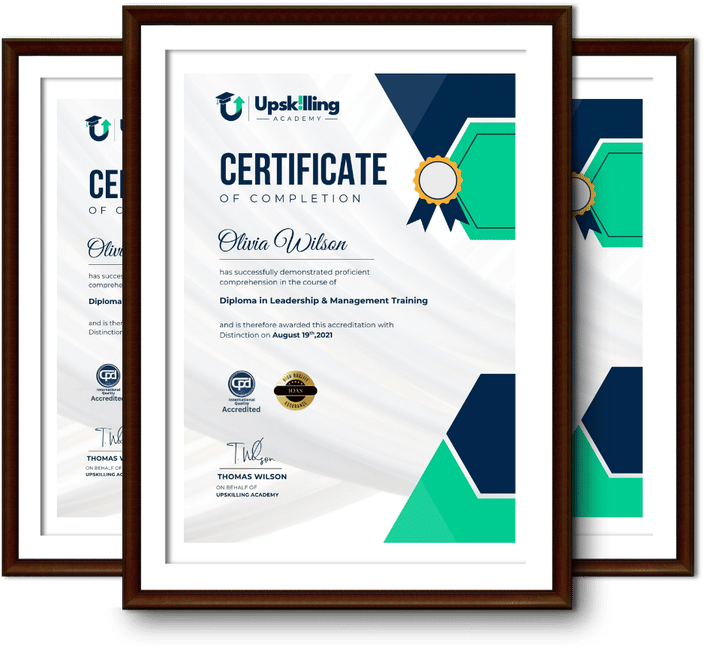
Certificate for Success at Every Step

  • No expiry date. You can keep and use the certificate forever.
  • Recognised across various UK industries.
  • Increases your chances of employability.
  • Boosts your professional credibility.
  • Shows you're up to date with industry knowledge.
Framed Upskilling Academy certificates of completion

Course Reviews

Christine Ferguson

My experience with you was fantastic and easy to navigate. I'm looking forward to taking the course.
Jesse Harding

Provided highly informative and helpful responses, with quick and efficient replies.

Gary Schwartz

The course selection is broad, engaging, easy to follow, and offers a good challenge.

Bailey Burrows

Excellent course with user-friendly website navigation, making it easy to follow. I'm really enjoying the experience.

Benjamin Moreno

Great course with valuable information. Easy to follow, and I appreciated the flexibility to work at my own pace.

Quality Accreditation

  • incensu Registered Education Supplier
  • Association of Healthcare Trainers member
  • The CPD Group approved provider #790985
  • Disability Confident Committed

FAQ for Level 3 Certificate in Techniques for Virtual Presentations

How do I access my course?

Once you complete your purchase, you’ll receive access to your course through your Upskilling Academy account. You can log in and access your learning materials online at any time.

How long do I have access to the course?

Your access period depends on the course and the package you purchase. Please check the course details or your order information for the applicable access period.

Can I study at my own pace?

Yes. Upskilling Academy courses are designed to provide flexible online learning, allowing you to study at a pace that suits your schedule.

Will I receive a certificate?

Certificate availability varies by course. Where a certificate is included, you’ll receive information about the requirements and how to obtain it within the course or upon completion.

Are the courses suitable for beginners?

Many courses are suitable for beginners, while others may assume some previous knowledge. Please review the individual course description for information about the recommended level and prerequisites.