Upskilling Academy
Trusted by 3 million learners 24/7 online training Money back guarantee Fully accredited courses
Level 3 Certificate in Adobe Premiere Pro Thumbnail Lifetime Access
Sale

Level 3 Certificate in Adobe Premiere Pro

Adobe Premiere Pro Course Overview Unlock the power of professional video editing with our comprehensive Adobe Premiere Pro…

Best Seller Limited Time Offer
Last Updated 17 Sep 2026 352 Enrolled English Flexible Schedule

Access to 1500+ Courses with free CPD Certificates for Only £99 Get Now

What you will learn

  • - Master professional video editing techniques using industry-standard software
  • - Enhance your creative storytelling with powerful editing tools
  • - Learn to add transitions, effects, and titles for polished videos
  • - Improve productivity with efficient workflow tips and shortcuts
  • - Prepare projects for multiple platforms, including YouTube and social media
  • - Build a portfolio of edited videos to showcase your skills
  • - Gain confidence to start freelance or professional video editing work

Description

Adobe Premiere Pro Course

Overview

Unlock the power of professional video editing with our comprehensive Adobe Premiere Pro course. Designed to take you from a beginner to an adept editor, this course offers a rich, hands-on learning experience with one of the industry’s most renowned video editing tools. From basic trimming and assembling to advanced color grading and sound design, you will explore the full spectrum of Premiere Pro’s capabilities. Whether your goal is to edit vlogs, commercials, short films, or social media content, this course provides the essential skills and confidence for bringing your visual stories to life.

Description

The Adobe Premiere Pro course is crafted to provide both theoretical knowledge and practical expertise in video editing using Adobe’s flagship application. The curriculum is structured to gradually build your skills, starting with the essentials of video editing, and progressively introducing more complex techniques and tools. This well-rounded approach ensures that upon completion, you will not just understand how to use Premiere Pro, but also how to employ it creatively and efficiently in a variety of editing scenarios.

You will learn topics such as:

  • Setting up Premiere Pro projects and understanding the interface
  • Importing and organizing media assets for streamlined workflows
  • Cutting, trimming, and arranging clips on the timeline
  • Utilizing transitions, effects, and motion graphics
  • Color correction and grading techniques
  • Audio enhancement and synchronization
  • Exporting your final product for web, broadcast, or social media
  • Keyboard shortcuts and workflow enhancements for faster editing

The course features a blend of instructional videos, guided projects, and downloadable resources. Each module is accompanied by downloadable assets for practice, quizzes to test your knowledge, and real-world assignments to apply your learning. Our instructors, who are professional video editors, provide insights, feedback, and tips drawn from years of industry experience. Whether you’re editing your first project or looking to refine your existing skills, this course is your gateway to mastering Adobe Premiere Pro.

Career Path

In a digital age dominated by video content, proficiency in Adobe Premiere Pro positions you at the forefront of creative industries. Here are some career opportunities and advancement prospects enabled by mastering Premiere Pro:

  • Video Editor: Work with production houses, digital agencies, or as a freelancer to edit films, commercials, music videos, and more.
  • Content Creator: Build your presence as a vlogger, YouTuber, or social media influencer by producing high-quality, engaging videos.
  • Post-Production Specialist: Join post-production studios to manage editing, color correction, and visual effects for larger projects.
  • Broadcast Editor: Contribute to television and news outlets, editing news stories, documentaries, or live event packages.
  • Corporate Video Producer: Create internal and external corporate communications, training materials, and promotional content.
  • Motion Graphics Designer: Dive into animation and graphic design workflows by integrating Premiere Pro with After Effects and Photoshop.
  • Education & Training: Use your skills to teach others, creating educational content or delivering workshops and training sessions.

A solid foundation in Premiere Pro equips you with critical skills sought after in media, marketing, entertainment, and beyond. As the demand for video content continues to rise, so too does the need for skilled editors who can deliver high-impact visuals. With this course, you’re not just learning software—you’re preparing for a dynamic career in visual storytelling.

Who Is This Course For?

This course is intentionally designed to serve a wide audience, from passionate hobbyists to aspiring professionals. You will find value in this course if you are:

  • Beginners: New to video editing and eager to learn Premiere Pro from the ground up.
  • Content Creators: Social media influencers, vloggers, or YouTubers aiming to elevate video quality and storytelling.
  • Students: Film, media, or communication students who need practical editing skills and portfolio development.
  • Professional Editors: Experienced with other software (e.g., Final Cut, DaVinci, iMovie) who want to expand their toolkit with Premiere Pro.
  • Photographers/Videographers: Seeking to offer complete photo-video services to clients.
  • Business Marketers: Entrepreneurs and marketing professionals wishing to produce in-house video content for branding or advertising.
  • Educators: Interested in creating professional video lessons, tutorials, or online course content.

If you have a story to tell or a message to share through video, this course empowers you with the technical knowledge and creative insight to make that story resonate.

Requirements

  • Computer: A desktop or laptop capable of running Adobe Premiere Pro efficiently (see Adobe’s system requirements for specifics).
  • Software: Adobe Premiere Pro installed (an active subscription or a free trial is acceptable).
  • Internet Connection: Required for course access, software downloads, and participation in discussions or support groups.
  • Basic Computer Skills: Some familiarity with file management (creating folders, saving files) and general computer operations is assumed.
  • No Prior Video Editing Experience Needed: All concepts will be introduced from the basics upward, with clear explanations and demonstrations.
  • Optional but Recommended:

    • A pair of headphones or speakers for audio editing sections
    • A mouse with a scroll wheel for easier timeline navigation
    • Raw video/images for practice (sample media provided if needed)

With these requirements in place, you’ll be fully equipped to begin your journey into the world of professional video editing with Adobe Premiere Pro.

Course Curriculum

Course Content

Adobe Premiere Pro_Module 1_Introduction to Adobe Premiere Pro

  • Adobe Premiere Pro_Lesson 1_Introduction to Adobe Premiere Pro

Adobe Premiere Pro_Module 2_Workspace and Workflow

Adobe Premiere Pro_Module 3_Importing Footage

Adobe Premiere Pro_Module 4_Managing Assets

Adobe Premiere Pro_Module 5_Editing Sequence and Clips

Adobe Premiere Pro_Module 6_Editing Audio

Adobe Premiere Pro_Module 7_Titling and The Titler

Adobe Premiere Pro_Module 8_Effects and Transitions

Adobe Premiere Pro_Module 9_Animation and Keyframes

Adobe Premiere Pro_Module 10_Exporting

Who should take the course

  • - Beginners who want to learn video editing
  • - YouTubers looking to improve their video quality
  • - Content creators for social media platforms
  • - Freelancers and aspiring video editors
  • - Marketing professionals creating promotional videos
  • - Students interested in digital media production
  • - Anyone wanting to tell stories through video

Certificate for Success at Every Step

  • No expiry date. You can keep and use the certificate forever.
  • Recognised across various UK industries.
  • Increases your chances of employability.
  • Boosts your professional credibility.
  • Shows you're up to date with industry knowledge.
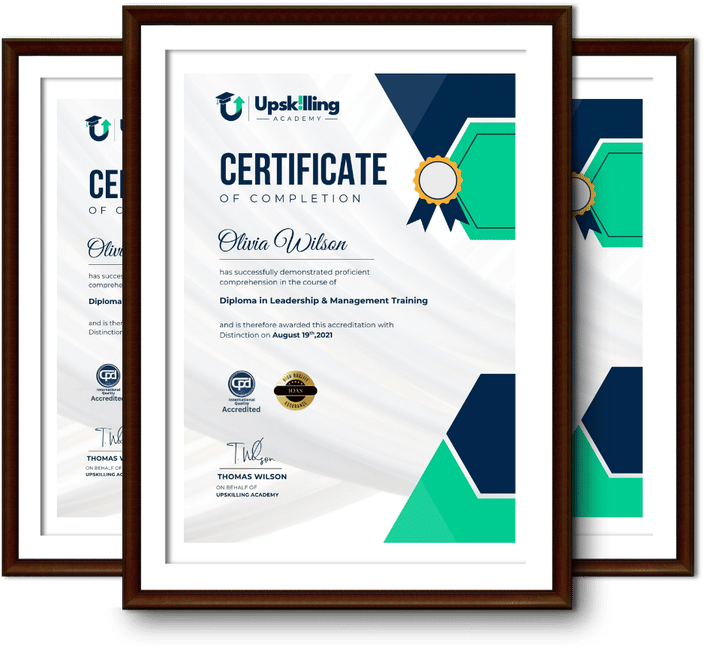
Framed Upskilling Academy certificates of completion

Course Reviews

Christine Ferguson

My experience with you was fantastic and easy to navigate. I'm looking forward to taking the course.
Jesse Harding

Provided highly informative and helpful responses, with quick and efficient replies.

Gary Schwartz

The course selection is broad, engaging, easy to follow, and offers a good challenge.

Bailey Burrows

Excellent course with user-friendly website navigation, making it easy to follow. I'm really enjoying the experience.

Benjamin Moreno

Great course with valuable information. Easy to follow, and I appreciated the flexibility to work at my own pace.

Quality Accreditation

  • incensu Registered Education Supplier
  • Association of Healthcare Trainers member
  • The CPD Group approved provider #790985
  • Disability Confident Committed

FAQ for Level 3 Certificate in Adobe Premiere Pro

How do I access my course?

Once you complete your purchase, you’ll receive access to your course through your Upskilling Academy account. You can log in and access your learning materials online at any time.

How long do I have access to the course?

Your access period depends on the course and the package you purchase. Please check the course details or your order information for the applicable access period.

Can I study at my own pace?

Yes. Upskilling Academy courses are designed to provide flexible online learning, allowing you to study at a pace that suits your schedule.

Will I receive a certificate?

Certificate availability varies by course. Where a certificate is included, you’ll receive information about the requirements and how to obtain it within the course or upon completion.

Are the courses suitable for beginners?

Many courses are suitable for beginners, while others may assume some previous knowledge. Please review the individual course description for information about the recommended level and prerequisites.