Upskilling Academy
Trusted by 3 million learners 24/7 online training Money back guarantee Fully accredited courses
Level 3 Certificate in Adobe After Effects Thumbnail Lifetime Access
Sale

Level 3 Certificate in Adobe After Effects

Adobe After Effects Overview Adobe After Effects is the industry-leading software for creating motion graphics, visual effects, and…

Best Seller Limited Time Offer
Last Updated 23 Sep 2026 352 Enrolled English Flexible Schedule

Access to 1500+ Courses with free CPD Certificates for Only £99 Get Now

What you will learn

  • - Master industry-standard motion graphics and visual effects techniques
  • - Enhance your videos with professional-quality animations and transitions
  • - Develop skills to create dynamic text, logos, and special effects
  • - Boost your employability in media, advertising, and film industries
  • - Gain hands-on experience with real-world projects and creative exercises
  • - Learn how to efficiently integrate After Effects with other Adobe Creative Cloud apps
  • - Build a strong portfolio to showcase your creative abilities to potential clients or employers

Description

Adobe After Effects

Overview

Adobe After Effects is the industry-leading software for creating motion graphics, visual effects, and compositing video and design elements with precision and creativity. This comprehensive course is designed to teach you the core skills and professional workflows needed to master After Effects—from fundamental animation principles to advanced techniques in visual storytelling, compositing, and integration with other Adobe Creative Cloud applications. Whether your aim is to produce impactful video content, broadcast motion graphics, or Hollywood-style visual effects, this course will equip you with a robust toolkit and creative confidence.

Description

This Adobe After Effects course is structured to take you from beginner to skillful practitioner, providing a hands-on learning experience through project-based modules. The curriculum begins with an introduction to the After Effects interface and gradually delves into more complex techniques. Early lessons cover essentials such as workspace organization, timeline navigation, and keyframing—the backbone of any animation. You’ll explore the power of layers, masks, and blend modes while gaining a thorough understanding of how to animate objects and apply basic effects.

As you progress, the course introduces the heart of motion graphics: text animation, shape layers, and motion paths. You will learn to bring static designs to life, creating engaging lower thirds, animated infographics, and dynamic transitions. Special attention is given to understanding motion tracking, stabilization, and working with green screen (chroma key) footage—skills highly sought after in professional environments.

Advanced modules focus on 3D layers, camera manipulation, particle systems, and integrating After Effects with Adobe Premiere Pro and Photoshop for a smooth post-production pipeline. Additional lessons explore expressions for automating animation, working with plug-ins, and optimizing project render settings for different output needs.

  • Discover After Effects’ core features and interface
  • Animate graphics, text, and illustrations
  • Build and composite complex visual effects
  • Apply color correction, visual enhancements, and audio adjustments
  • Integrate with other Creative Cloud applications
  • Export and share projects efficiently

Throughout the course, real-world projects challenge you to develop creative solutions, mirroring the type of work you would encounter in multimedia studios, digital agencies, or freelance settings. With expert instruction and practical assignments, you’ll gain a deep understanding of After Effects and become capable of producing high-quality visual content that stands out.

Career Path

After completing this Adobe After Effects course, a range of exciting and creative career paths become available to you. Motion graphics and visual effects are in high demand across industries such as television, film, advertising, online media, and corporate communications. As you master the tools and techniques taught, you can confidently pursue roles in:

  • Motion Graphics Artist: Design captivating animation for commercials, explainer videos, broadcast graphics, title sequences, and more.
  • Visual Effects (VFX) Artist: Create spectacular effects for films, TV series, and online content by compositing live-action footage with computer-generated imagery.
  • Video Editor: Enhance your editorial workflow by integrating effects, graphics, and titles seamlessly into video projects.
  • Multimedia Designer: Develop interactive content and promotional materials for web, social media, and digital signage.
  • Content Creator: Elevate your own YouTube, TikTok, or online portfolio with professional motion graphics and branded visuals.
  • Animator: Work in 2D and 3D animation studios, leveraging After Effects to animate characters and environments.

Countless organizations and clients value the ability to produce compelling visual stories. With After Effects on your resume, you open yourself to freelance opportunities, agency work, or creative roles within in-house media teams world-wide.

Who Is This Course For?

This course is tailored for anyone seeking a strong foundation in motion graphics, animation, and video effects—whether you are just getting started or hoping to sharpen your skills. You’ll benefit most if you identify with the following groups:

  • Beginners: No prior experience with After Effects is required; the course starts with the basics and guides you step by step.
  • Graphic Designers: Expand your design expertise into moving images and video content creation.
  • Video Editors: Enhance your storytelling by adding custom effects, transitions, and animated elements to your edits.
  • Animators: Complement your animation workflow with advanced compositing and motion techniques.
  • Content Creators & Social Media Managers: Stand out online with polished, branded graphics and engaging effects.
  • Students in Media, Film, or Communication: Gain the practical experience required for assignments, internships, or future careers in multimedia production.

Requirements

To ensure you get the most out of this Adobe After Effects course, please review the following prerequisites:

  • Hardware: A modern computer (Windows or macOS) capable of running Adobe After Effects. Minimum hardware requirements include a multi-core processor, 16GB RAM (32GB recommended), and a dedicated graphics card for best performance.
  • Software: Access to Adobe After Effects—preferably the latest Creative Cloud version. A free trial is sufficient for starting the course; students may consider a subscription for continued learning.
  • Basic Computer Literacy: Familiarity with general computer operations (file management, installing software, using keyboard shortcuts).
  • Optional: While not required, experience with Adobe Photoshop, Illustrator, or Premiere Pro can enhance your overall workflow, but all necessary concepts will be introduced during the course.
  • Internet Connection: Required for downloading course materials, project files, and accessing any online support or collaboration tools.

No previous knowledge of motion graphics or animation is expected. Enthusiasm for visual storytelling and a willingness to practice new skills will help you achieve the best results throughout your learning journey.

Course Curriculum

Course Content

Module 1_ Introduction to Adobe After Effects

  • Lesson 1_ Introduction to Adobe After Effects

Module 2_ Working with Layers and Composition

Module 3_ Animation Fundamentals

Module 4_ Text and Typography Animation

Module 5_ Working with Effects and Presets

Module 6_ Masking and Rotoscoping

Module 7_ Motion Tracking and Stabilisation

Module 8_ Working in 3D and Camera Animation

Module 9_ Rendering and Exporting

Module 10_ Advanced Techniques and Workflow Optimisation

Who should take the course

  • - Beginners interested in learning motion graphics
  • - Video editors who want to add visual effects
  • - Graphic designers expanding into animation
  • - Social media content creators
  • - Marketing professionals creating video ads
  • - Filmmakers enhancing post-production skills
  • - Educators producing engaging video materials

Certificate for Success at Every Step

  • No expiry date. You can keep and use the certificate forever.
  • Recognised across various UK industries.
  • Increases your chances of employability.
  • Boosts your professional credibility.
  • Shows you're up to date with industry knowledge.
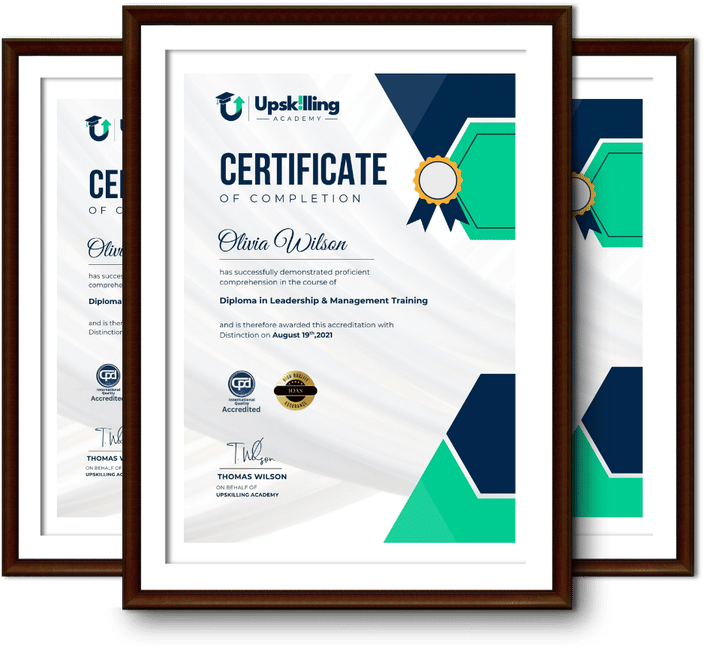
Framed Upskilling Academy certificates of completion

Course Reviews

Christine Ferguson

My experience with you was fantastic and easy to navigate. I'm looking forward to taking the course.
Jesse Harding

Provided highly informative and helpful responses, with quick and efficient replies.

Gary Schwartz

The course selection is broad, engaging, easy to follow, and offers a good challenge.

Bailey Burrows

Excellent course with user-friendly website navigation, making it easy to follow. I'm really enjoying the experience.

Benjamin Moreno

Great course with valuable information. Easy to follow, and I appreciated the flexibility to work at my own pace.

Quality Accreditation

  • incensu Registered Education Supplier
  • Association of Healthcare Trainers member
  • The CPD Group approved provider #790985
  • Disability Confident Committed

FAQ for Level 3 Certificate in Adobe After Effects

How do I access my course?

Once you complete your purchase, you’ll receive access to your course through your Upskilling Academy account. You can log in and access your learning materials online at any time.

How long do I have access to the course?

Your access period depends on the course and the package you purchase. Please check the course details or your order information for the applicable access period.

Can I study at my own pace?

Yes. Upskilling Academy courses are designed to provide flexible online learning, allowing you to study at a pace that suits your schedule.

Will I receive a certificate?

Certificate availability varies by course. Where a certificate is included, you’ll receive information about the requirements and how to obtain it within the course or upon completion.

Are the courses suitable for beginners?

Many courses are suitable for beginners, while others may assume some previous knowledge. Please review the individual course description for information about the recommended level and prerequisites.